Appearance
AP ESL Controller HS_C09959 Product Manual
AP ESL Controller HS_C09959 Product Manual
STATEMENT
This document and all its contents contained remain the proprietary material of Smart Label Solutions Inc. (SLS) and are protected by British Columbia laws and applicable international conventions on copyrights. Any reproduction, transmission, disclosure, revision, modification or use otherwise of this document or the whole or part of its contents, in whatever form and by whatever means, is not permitted without prior express written authorization from SLS. Offenders will be liable for any and all damages caused by their offence hereof and will be subject to all remedies that SLS is entitled to seek under applicable laws.
ABOUT THE MANUAL
Product Manual (HS-AP-GEN3001): This manual describes an instruction for ESL controller HS_C09959 involved in its features, specifications, the related configurations and precautions. Help you quickly understand all information for this device.
Installation Manual (HS-AP-GEN3002): Guides an instruction on how to plan the installation, select the installation-site, and give the detailed operations and precautions during installation, so as to reach the optical performance.
Upgrade Manual (HS-AP-GEN3003): Gives the guidance on how to upgrade to a new version, and also involved in FAQ troubleshooting.
Release Notes (HS-AP-GEN3010): Outlines the software version changes and fixed bugs, including new, updated, and deleted performance.
TARGET USERS
This document provides engineers with necessary data and related guidelines. Users have to master the basic knowledge on communication, network and so on. This manual is applicable for the below engineers:
Testing Engineer
Technical Support Engineer
After Sales Engineer
Installation Engineer
SYMBOL DESCRIPTION
| Icon | Description |
|---|---|
 | Information indicated with this icon should be paid specia attention and attached great importance by the reader. |
 | Information indicated with this icon is the explanation on the formal text for the readers to comprehend the text better. |
| [X-X] | It means special noun definition is provided here. |
EXPLANATION OF TERMS
| Acronym | Expanded form | Description |
|---|---|---|
| ESL Controller | ESL Controller | Also called AP that is used for data interaction between ESL-Working and ESL Controller. |
| ESL | Electronic Shelf Label | Used for displaying product information like promotion information, price and grade, etc. |
| RF | Radio Frequency | Electromagnetic frequency that can radiate into space. |
1 Overview
HS_C09959 is an Hanshow’s third-generate ESL controller. With fast transmission speed, high-performance and low power consumption, the new-generate ESL controller offers an enhanced data business experience.
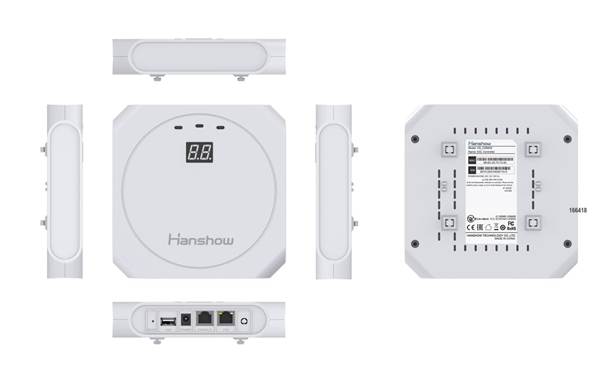
Figure 1-1 Six-views of HS_C09959
HS_C09959 works in 2.4GHz wireless frequency band for data transmission and information interaction between ESL-Working and ESLs. HS_C09959 adopts modular and omnidirectional in-board antenna design. And it is equipped with an ARM Cortex- A7 processor, RF and other modules, supporting all Hanshow products. HS_C09959 appearance is shown in Figure 1-1
1.1 System architecture
Hanshow ESL system includes PriSmart/ShopWeb, ESL-Working, ESL controller (AP), Electronic Shelf Label (ESL) and Handheld Terminal (PDA), as shown in Figure 1-2. Specifically, ESL controller acts as data transmission link to forward data between ESL- Working and ESLs.
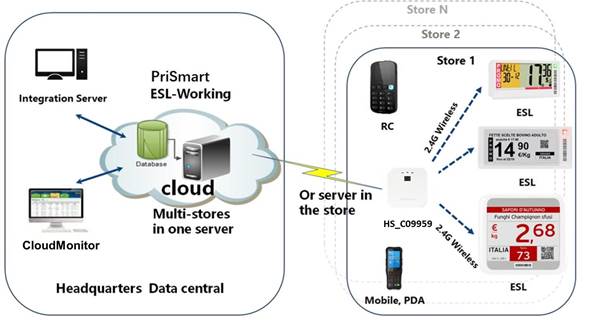
Figure 1-2 ESL system architecture
HS_C09959 is connected to ESL-Working system via Ethernet interface (POE). Meanwhile it builds bi-directional 2.4GHz wireless communication with ESLs.
- Downlink: HS_C09959 receives downlink packets from ESL-Working system and transmits the data like price, inventory and template to ESLs.
- Uplink: HS_C09959 forwards the ESLs’ heartbeat packets or other information to ESL-Working system based on ESL wireless protocol standard.
1.2 Features
The features include:
- Operating System (OS): Embedded Linux, which is responsible for data interaction with ESL-Working system, including the registration of ESL controller system, heartbeat packet transmission and so on. Supports OTA upgrade.
- RF system: Four RF modules. Each of them has the independent antenna, with concurrent communication.
- Intelligent dual-system: Supports dual-system, with automatic disaster tolerance.
- Memory: Supports 512MB DDR3L + 256MB NandFlash
- Compatibility: Supports all Hanshow ESLs, including LCD and EPD ESLs.
- Multiple power supply: Supports POE and AC/DC power adapter supply.
- Management configuration: Supports Web configuration.
- LED indicator: Real-time display working status.
2 Hardware performance
2.1 Specifications
Table 2-1 shows HS_C09959 specifications.
Table 2-1 HS_C09959 specifications
| Item | Description |
|---|---|
| Input voltage | DC 12V or POE 802.3af/at |
| Rated current | 1A (adapter)/350mA (POE) |
| Rated power | 12W |
| Other | Overload/over-voltage/over-heat protection |
| CPU | ARM Cortex-A7 processor |
| Memory | 512MB DDR3L + 256MB NandFlash |
| OS | Linux 4.1.15 |
| Working frequency | 2402MHz ~ 2480MHz 2478MHz ~ 2493MHz (Japan only) |
| Transmit power | 6dBm by default |
| Antenna gain | 2dBi |
| Antenna characteristics | Four-way omni-directional internal antenna |
| Sensitivity | -95dBm at 500Kbps -97dBm at 100Kbps |
| Connection rate | 10/100M (adaptive) |
| Auto-negotiation | Support |
| Auto MDI/MDIX | Support |
| DHCP | Support |
| Input voltage | 36V ~ 57V DC |
| Output voltage | 12V |
| Rated current | 1A |
| Maximum power | 12W |
| Standard | IEEE 802.3af/at |
| Idle | 12V/160mA |
| Maximum | 12V/370mA |
| Operating temperature | 0℃ ~ 50℃ |
| Storage temperature | -30℃ ~ 70℃ |
| Relative Humidity (%RH) | 10% ~ 90% (Non-condensing) |
| Case and bottom shell | ABS plastic material |
| Indicate lampshades | Translucent PC |
| LWH (mm) | 16616640.5 |
| Gross weight (g) | 505 |
| Net weight (g) | 397 |
| - | White or black |
2.2 Physical interface
HS_C09959’s physical interfaces and each description is as shown in Figure 2-1 and Table 2-2.
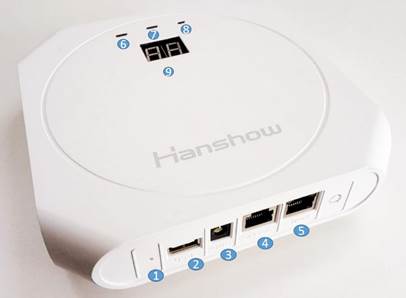
Figure 2-1 Hardware interface of HS_C09959
Table 2-2 Function description for each interface
| No. | Interface name | Description |
|---|---|---|
| 1 | Reset hole | Press and hold the reset hole for more than 5s to restore factory settings. l Press the reset hole to switch between DHCP-enabled and fixed IP (192.168.1.199). It is invalid to press again within 30s after this feature is enabled. For more detailed information, see the section of 4.1. |
| 2 | USB | USB2.0 interface. The output current is less than 5V/250mA. |
| 3 | POWER | Using Hanshow standard 12V/1A DC power adapter. |
| 4 | CONSOLE | Used for debugging equipment by professionals. |
| 5 | POE | Adaptive 10M/100M Ethernet. To support IEEE 802.3at/af standard Ethernet power supply. |
| 6 | LED indicator | Used for system status. For more information, see the section of 2.3. |
| 7 | LED indicator | Used for network status. For more information, see the section of 2.3. |
| 8 | LED indicator | Used for power status. For more information, see the section of 2.3. |
| 9 | Two LED nixies | Green, to display HS_C09959 ID obtained from ESL-Working. (Keep the reading direction consistent with Hanshow logo on front panel.) |
1.1 LED meaning
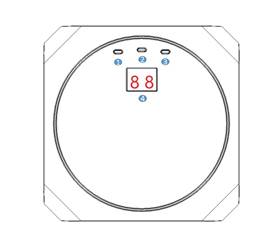
Figure 2-2 shows two LED nixies and three LED indicators on front panel of HS_C09959. Their meaning is shown in Table 2-3.
Figure 2-2 Front panel of HS_C09959 Table 2-3 Description of nixies and indicators
| No. | Name | Status | Description |
|---|---|---|---|
| 1 | System status indicator | Steady on green | The system is running normally. |
| Blinking green | The system is transmitting data. | ||
| Steady on red | The system is not running normally. | ||
| 2 | Network status indicator | Steady on green | Ethernet connection is normal, but the system is not connected to ESL-Working. |
| Blinking green | Ethernet connection is normal, and the system is connected to ESL-Working normally. | ||
| Steady on red | Ethernet connection is abnormal. | ||
| 3 | Power indicator | On | Green light is on when your AP powered on. |
| Off | Green light is off when your AP powered off. |